Ncview
Ncview is simple yet powerful visual browser to open and view netCDF files. This software is useful to check and view the input and output files of WRF-Fire.How to Install Ncview on Linux
Linux users can install Ncview from Advanced Package Tool (apt-get) using the following command:
$ sudo apt-get install ncview
How to Install Ncview on Mac
Mac users can install Ncview using Homebrew:$ brew install ncview
How to Use Ncview
netCDF files can be opened in Ncview using the following command on both Linux and Mac:
$ ncview (path to the netcdf file)/(netcdf file)
After the file is opened in Ncview, variables in the netCDF file can be viewed from variables menu (see below figure).

Ncview window after opening a netCDF file
After selecting the variable of interest, it will be shown in XY plane using color-filled contours.

Ncview window after choosing a variable
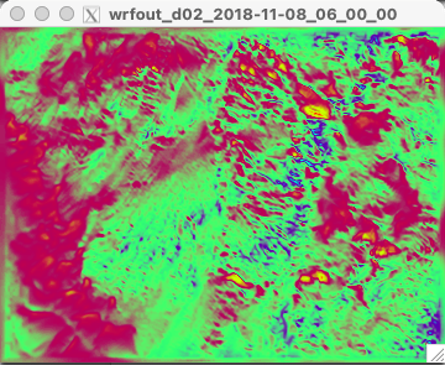
Output window of Ncview showing the value of the chosen variable in XY plane
Ncview can also plot 2D graphs of the selected variable. By left-clicking on a point of interest from the output window, Ncview generates a graph showing the value of the chosen variable with respect to a transect passing the chosen point.

Sample of Ncview generated 2D graph